Engineered for Rapid Template Design
Everything you need to compile, review, and fine-tune your mockups with modern engineering tools.
Zero-Latency Compilation
Pug, Handlebars, JSX, and HTML code re-render on every keystroke in our isolated sandboxed iframe.
Dynamic Injections
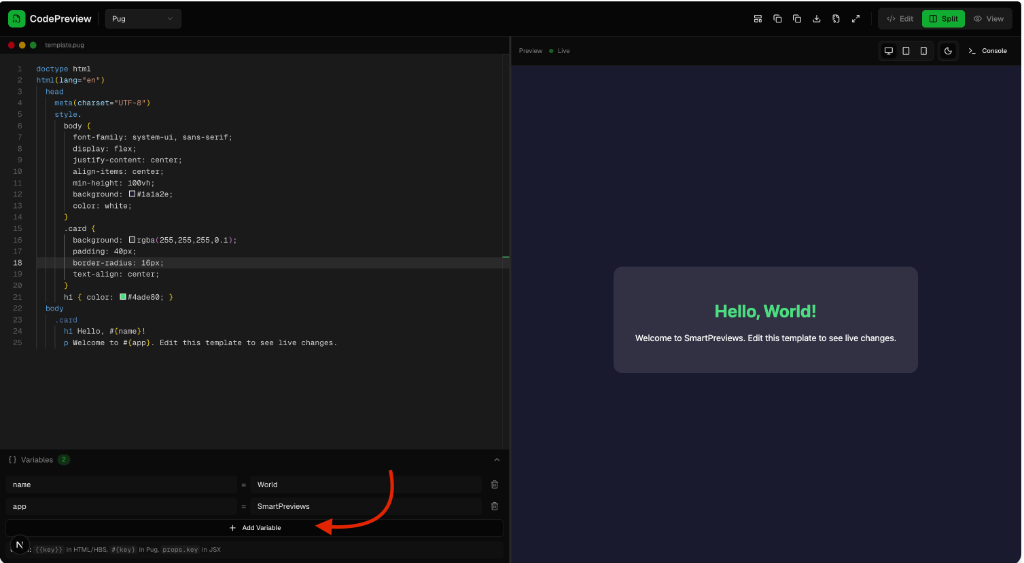
Declare key-value variables dynamically at the bottom panel and watch them instantly resolve inside the compiler context.
Responsive Testing
Simulate device resolutions with desktop, tablet, and mobile triggers. Verify content flow effortlessly.
Sandbox Console
Capture logs, errors, and warning statements flowing from inside your templates in a dedicated live output window.
Empower templates with dynamic properties.
Inject custom values dynamically into markup without hardcoding content. Define variables, update them on the fly, and see immediate rendering.
Open the Variables Panel
Expand the collapsible **Variables** drawer located at the bottom-left corner of the editor view.
Declare Names & Values
Click the Add Variable row. Fill in the key (e.g. `name`) and the desired value (e.g. `World`).
Interpolate in the Markup
Use template-specific tags matching your engine. Double brackets for HTML/HBS, interpolation for Pug, or props fields for JSX.
Syntax Rules by Engine
Quick comparison of how to fetch variables in each supported templating engine.
HTML / Handlebars Syntax
Seamless reactivity bindings in active scope
1<!-- Reference name & app variables -->2<div class="card">3 <h1>Hello, {{name}}!</h1>4 <p>Welcome to {{app}}.</p>5</div>